Grow Your Money with SSS Personal Equity and Savings Option (PESO) Fund

Social Security System has launched the Personal Equity and Savings Option (PESO) – a tax-free investment with guaranteed earnings for all SSS members. Employees, self-employed, voluntary members and OFWs can now save  their excess earnings to build their secure future.
The SSS Provident Fund is open to all active members who below 55 years of age and not yet filed any final claim under the regular SSS program. For Self Employed, Voluntary Members and Overseas Filipino Worker (OFW) should be paying the maximum amount of contributions under the regular SSS program in order to register in the P.E.S.O Fund.


SSS members who join the Provident Fund is allowed to contribute a maximum of Php 100,000 per annum and a minimum of Php 1,000 per contribution.

advertisement

Note: The Fund can only claim if the member will file a retirement or total disability. If the contributor died, his/her beneficiaries can claim the the money invested.

Penalties and service fees will be deduct in the fund if a member will withdraw his contribution within the 5-year retention period.

Continue reading

6 Step to Register and View SSS Online (Contribution on Social Security System)

Social Security System or also known as SSS, is a government agency that helps Filipino to invest for their future. Members who pay for their monthly contribution can also make 'salary' or 'calamity' loans. A retirement benefits (pension) will also give for all the active members.


With the help of internet, all SSS members and pensioners can now hassle-free monitor their contribution online for free. They can check their account anytime without going to the SSS office. For employee members, you can check if your employer funding your account. With this instruction we make, you can view your SSS contribution without fall in line.

advertisement


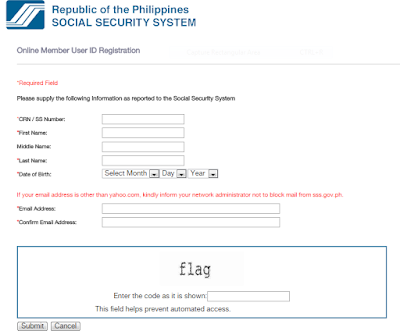
1. Go to the  member's registration page of official SSS website. 
2. Completely fill-up all the required field. (Name, birth date, SSS number, and valid email address)


3. Enter the captcha (code) and tick the submit button.
4. SSS will send you an email, it is a link that confirm your email address and send you to another webpage. Note: Don't forget to check your Spam folder.
5. Fill-up the 2nd registration form.


***SBR No./OTC (For Self-employed, Voluntary member, OFW, Househelper, and Non-working spouse)
*If mode of payment is OTC or over-the-counter at SSS branch, type the 8-digit following the T# (eg: T#15000075)
*If you are paying at the bank, type the 6-digit SBR No. (Special Bank Receipt No.)
*If you’re paying through SM Bayad Center, Remittance Center or I-Remit, Western Union, type the 6-digit OTC Validation Number
*If you’re paying SSS by ADA (Auto-debit Arrangement) type 6 zeros (000000) in the SBR No./OTC box
6. Check the "I accept the Terms and Conditions” box and click submit. SSS will send you an email containing your username and password. You can now log in into you SSS account! :D

Don't forget to share it to your friends.!
source: philpad
Continue reading